
 en
en italiano
 čeština
 Deutsch
 français
 hrvatski
 magyar
 polski
 српски
 русский
 中文
中文 中文
中文 한국어
한국어 español
Numbered Markers

Ribbon: Express Tools > Text > Numbered Markers
Menu: Express > Text > Numbered Markers
Toolbar: Express > Express - Text > Numbered Markers
Keyboard: MARKERS
This function allows you to easily create numbered or alphabetical markers
with various graphic styles.
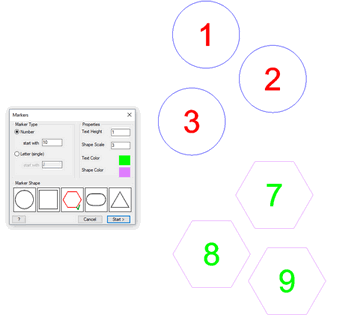
OPTIONS:
Marker Type: you can choose the type of incremental information to be inserted in the markers. Options include Number or Letter. When the function ends, the next time it is run, it automatically continues the previous series.
Properties: in this section you can specify the size of the markers and their associated color.
Marker Shape: displays all available graphics for the markers.
Please note that all options in this dialog apply only to new markers (these options cannot modify existing ones). Existing markers can be edited using standard CAD commands, just like regular single entities.
How do I...
Create Arc-Aligned Text
Create Area Text from a Defined Profile