
 en
en italiano
 čeština
 Deutsch
 français
 hrvatski
 magyar
 polski
 српски
 русский
 中文
中文 中文
中文 한국어
한국어 español
AreaText

Ribbon: Express Tools > Text > Area text
Menu: Express > Text > Area text
Toolbar: Express > Express - Text > Area text
Keyboard: AREATEXT
This function allows you to select an area through profile definition,
and creates a text that indicates the Area value.
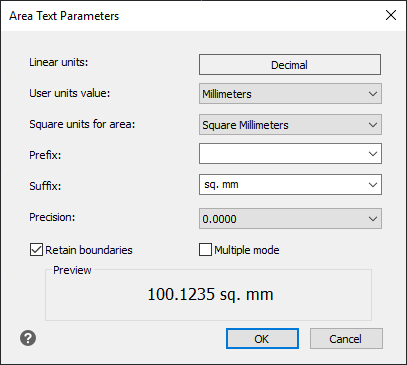
DIALOG FIELDS:
Linear units: non-editable field that displays the drawing units configuration (Decimal or Architectural).
User units value: here you can select the unit type used in your drawing.
Square units for area: here you can choose the square units you prefer for the Area Value.
Prefix: allows you to type string to add as prefix.
Suffix: this field is automatically filled with a suffix coherent to the "Square units for area". You can customize it simply by typing the desired string.
Precision: allows you to choose the decimals number.
OPTIONS:
Retain boundaries: Default value ON. Allows you to decide if the drawn boundaries is maintained or not.
Multiple mode: Default value OFF. Allows you to activate the multiple insertion mode.
How do I...
Create Arc-Aligned Text
Create Numbered or Alphabetical Markers