
 en
en italiano
 čeština
 Deutsch
 français
 hrvatski
 magyar
 polski
 српски
 русский
 中文
中文 中文
中文 한국어
한국어 español
Pan (command line version)
Pan (command line version)
Keyboard: -PAN
Alias: -P
Drags the display in the viewport so you can see areas not visible in the window.
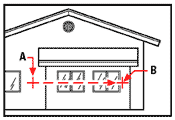
Specify base point or displacement: Specify the point from which you want to move the display.
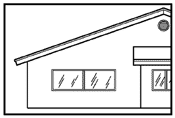
Specify second point:Specify the point to which you want the display moved. The difference between the first point and the second point indicates the distance and direction you want to move the display.
|
|
|
|
Result. |
Tell me about...
Pan (dialog box version)