en
en italiano
 čeština
 Deutsch
 français
 hrvatski
 magyar
 polski
 српски
 русский
 中文
中文 中文
中文 한국어
한국어 español
Insertion Point snap
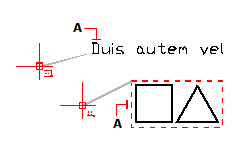
Use the Insertion Point snap to snap to the insertion point of an attribute, block, or text entity.
To set the Insertion Point snap
Do one of the following to choose Insertion Point ( ):
):
On the ribbon, choose Draw > Insertion Point (in Entity Snaps).
On the menu, choose Tools > Entity Snaps> Insertion Point.
On the Entity Snaps toolbar, click the Insertion Point tool.
Type insertion and then press Enter.
|
|
|
To snap to an insertion point, select anywhere on the entity (A). |