
 en
en italiano
 čeština
 Deutsch
 français
 hrvatski
 magyar
 polski
 српски
 русский
 中文
中文 中文
中文 한국어
한국어 español
Effects of Editing an Image
When an image is modified using any tool from the Raster Draw module, changes made to the original image file may affect any other drawings that reference the same image.
Upon saving or closing the current drawing, the following dialog box is displayed:
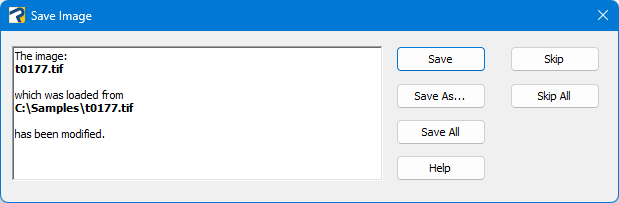
Save
The image will be saved by overwriting the original file.
Note: All drawings that reference this image will reflect the applied modifications.
Since altering the original image may affect any other drawing in which it is used, it is recommended to use Save As when in doubt, in order to preserve the integrity of the original file.
Save as
This option allows the modified image to be saved with a different name and/or file format.
It is useful when you want to avoid altering the original image and potentially affecting other drawings that may reference it.
Note: Depending on the selected format, it may also be possible to apply specific encoding options during the saving process.
Save All
It works like "Save" but applies to all the images in the drawing.
Note: All drawings that reference these images will reflect the applied modifications.
Since altering the original images may affect any other drawing in which they are used, it is recommended to use Save As when in doubt, in order to preserve the integrity of the original files.
Skip - Skip All
With Skip, modifications to the image (or images) are ignored.