
 en
en italiano
 čeština
 Deutsch
 français
 hrvatski
 magyar
 polski
 српски
 русский
 中文
中文 中文
中文 한국어
한국어 español
Cloud - Restore procedure
Toolbar: PCAD > Cloud > Restore
from Cloud ( )
)
Menu: File > Restore from Cloud
Keyboard: OPENCLOUD
Opening projects saved on a Cloud
IMPORTANT NOTE: You cannot
work on or display your projects directly from the Cloud. Projects must
first be downloaded to your computer. The Cloud is only an online backup
service.
- Execute the Restore from Cloud command
- Select the Cloud where the project was archived
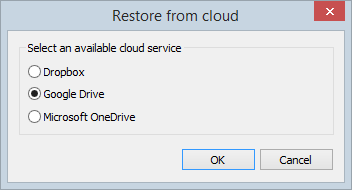
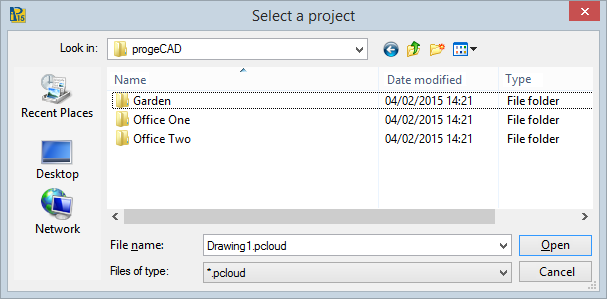
- Choose the *.pcloud file you need in the folder assigned
to progeCAD projects
- At this step you are prompted to select a path on your computer
where to place a folder containing all the project files extracted
from the Cloud.
The *.pcloud archive is automatically decompressed and saved on your computer as a normal folder with files. ATTENTION: You should consider as working files those downloaded on your computer and not the ones uploaded on the Cloud. - After editing your project, if modifications were required, you need to repeat the Backup to cloud command, making sure that synchronization is active, so as to update your online backup.
Tell me about...