
 en
en italiano
 čeština
 Deutsch
 français
 hrvatski
 magyar
 polski
 српски
 русский
 中文
中文 中文
中文 한국어
한국어 español
Layer Walk
Ribbon: Home > Layers > Layer
Walk ( )
)
Menu: Format > Later Walk
Toolbar: PCAD > Layer II > Layer Walk
Keyboard: LAYWALK
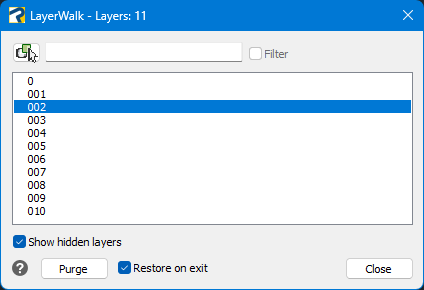
This function allows you to walk between existing layer.
For example you can use this function to quickly review your drawing.
 Allows
you to select one or more objects in the drawing to isolate the related
layers.
Allows
you to select one or more objects in the drawing to isolate the related
layers.
Filter: enter part of a layer name to create a temporary filter. Use the * wildcard to match multiple layers (e.g., *sheet01* selects all layers containing “sheet01”).
List: you can manually select the layer you want to display with a single click. By double-clicking, you can turn the “Always Show” option on or off. You can also use the Ctrl or Shift + right-click combination to select multiple layers at the same time.
Purge: enables deletion of the selected layer when it is empty.
Show hidden layers:displays hidden layers in the list when enabled.
Restore on Exit: allows you to restore the original layers status when you close the Layer walk dialog.