
 en
en italiano
 čeština
 Deutsch
 français
 hrvatski
 magyar
 polski
 српски
 русский
 中文
中文 中文
中文 한국어
한국어 español
Isodraft

Keyboard: ISODRAFT
The ISODRAFT command turns isometric drafting settings on or off and sets the current 2D isometric drafting plane.
The primary advantage of ISODRAFT is that it allows you to turn isometric drafting settings on or off while automatically updating all related controls. When drawing 2D isometric representations of 3D models, ISODRAFT allows you to:
Control ortho directions
Adjust snap orientation
Set grid orientation
Define polar tracking angles
Orient isometric circles
Ortho mode automatically uses the correct axis pair at 30°, 90°, or 150°, based on the current isometric plane. The active plane also determines the orientation of isometric circles created with the Isocircle option of the ELLIPSE command.
You can activate isometric drafting by typing ISODRAFT at the command
line or by clicking the ISODRAFT button in the status bar.
Once activated, you can switch between the available isoplanes either from
the command line or by right-clicking the ISODRAFT button in the status
bar.
 Isoplane Right: defines the right isoplane, based
on the 90° and 30° axis pair.
Isoplane Right: defines the right isoplane, based
on the 90° and 30° axis pair.
 Isoplane Top: defines the top isoplane, based on
the 30° and 150° axis pair.
Isoplane Top: defines the top isoplane, based on
the 30° and 150° axis pair.
 Isoplane Left: defines the left isoplane, which
is based on the 90° and 150° axis pair.
Isoplane Left: defines the left isoplane, which
is based on the 90° and 150° axis pair.
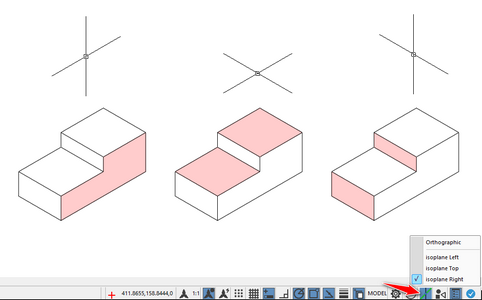
Note: pressing Ctrl+E or F5 allows you to quickly cycle through the isometric planes.