
 en
en italiano
 čeština
 Deutsch
 français
 hrvatski
 magyar
 polski
 српски
 русский
 中文
中文 中文
中文 한국어
한국어 español
Automatic regeneration settings
This section describes the fields and options available in the Automatic regeneration settings dialog box.
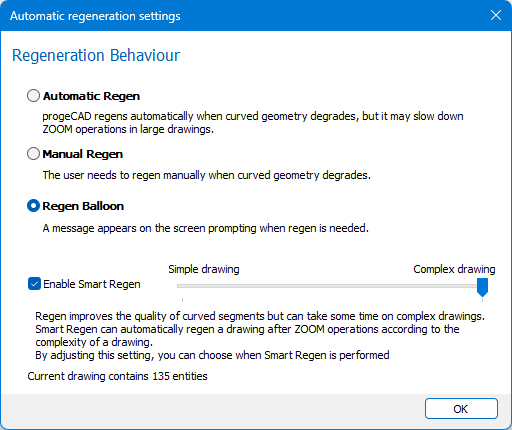
Automatic Regen: progeCAD automatically regenerates the drawing when the quality of curved geometry deteriorates.
This improves visual accuracy but may slow down zoom operations in large or complex drawings.
Manual Regen: the user must manually regenerate the drawing when curved geometry becomes visually degraded.
Regen Ballon: a message appears on the screen prompting when regen is needed.
Enable Smart Regen: enables automatic Smart regeneration in drawings with fewer than 100,000 entities. The threshold value can be customized by the user to better balance performance and visual quality
Regen improves the quality of curved
segments but may take some time on complex drawings.
Smart Regen automatically
performs a regeneration after zoom operations, depending on the size and
complexity of the drawing.
By adjusting this setting, you can control when Smart Regen is triggered
to balance performance and visual quality.
How to...