
 en
en italiano
 čeština
 Deutsch
 français
 hrvatski
 magyar
 polski
 српски
 русский
 中文
中文 中文
中文 한국어
한국어 español
Triangulate
Triangulate

Ribbon: Add-On > DTM > Triangulate
Toolbar: PCAD > Add-On > Triangulate
Menu: Add-On > Triangulate
Keyboard: TRIANGULATE
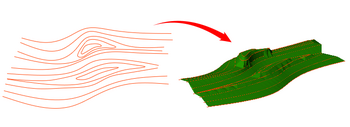
This function allows you to generate a triangulation between existing
3D points or isolines.
The resulting objects can be used to generate section graphics through
the AutoSEZ plugin.
PROCEDURE:
- Run the TRIANGULATE command
- Select the objects of interest: you can choose points or isolines.
If you select points, pick them using a crossing window.
If you select isolines, you can either select them individually or define the Step factor (1–100% of curve length) to generate intermediate points along the isolines. The default value is 5.
- Choose your preferred parameters for the triangular geometries.
DIALOG OPTIONS:
Result entities: it's possible to choose between Mesh,
3D Face and 3D Polylines, and you can also select the color of the resulting entity.
Destination layer: you can choose whether the triangular objects
are placed on the Current Layer,
an Existing Layer, or a
New Layer.
How do I...