
 en
en italiano
 čeština
 Deutsch
 français
 hrvatski
 magyar
 polski
 српски
 русский
 中文
中文 中文
中文 한국어
한국어 español
Elevation Text

Ribbon: Add-On > DTM > Elevation Text
Toolbar: PCAD > Add-On > DTM > Elevation Text
Menu: Add-On > DTM > Elevation Text
Keyboard: ELEVTEXT
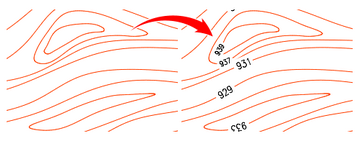
This command places text on the isolines of a selected level curve, displaying the elevation value.
PROCEDURE:
Run the ELEVTEXT command.
Select an isoline or a set of isolines where you want to place the elevation text.
Press Enter to continue.
Choose whether to rotate the text 180 degrees by selecting Yes or No.
The elevation text is inserted along the selected isolines.
How do I...