en
en italiano
 čeština
 Deutsch
 français
 hrvatski
 magyar
 polski
 српски
 русский
 中文
中文 中文
中文 한국어
한국어 español
Extruding solid faces
Extruding solid faces
1 Do one of the following to choose Extrude Face ( ):
):
On the ribbon, choose Draw 3D > Extrude Face (in Solid Editing).
On the menu, choose Modify > Solid Editing > Extrude Face.
On the Solids Editing toolbar, click the Extrude Face tool.
2 Select the entity with the face you want to extrude.
3 Select the face(s) to extrude, and press Enter.
4 Do one of the following:
Specify the height of extrusion.
Type p and press Enter to select a path for extrusion.
5 If you specified a height, specify a taper angle.
|
|
||
|
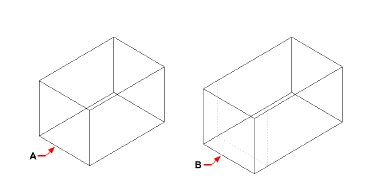
Select the entity to extrude, and then specify the face(s) to extrude (A), and the height of extrusion or path. |
|
The resulting entity with the face extruded to position (B). |