en
en italiano
 čeština
 Deutsch
 français
 hrvatski
 magyar
 polski
 српски
 русский
 中文
中文 中文
中文 한국어
한국어 español
Drawing rays
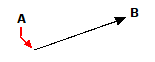
A ray is a line in three-dimensional space that starts at a point and extends to infinity. Because rays extend to infinity, they are not calculated as part of the drawing extents. The default method for drawing a ray is to select the start point of the ray and then specify its direction. You can draw a ray in any of the following ways:
• Horizontal draws the ray parallel to the x-axis of the current user coordinate system (UCS).
• Vertical draws the ray parallel to the y-axis of the current UCS.
• Angle draws the ray parallel to a specified angle.
• Bisect draws the ray perpendicular to an existing entity.
• Offset draws the ray parallel to an existing entity.
To draw a ray
1 Do one of the following to choose Ray ( ):
):
• Select Ray from the ribbon or the menu.
• On the Draw toolbar, click the Ray tool.
• Type ray and then press Enter.
2 Specify the start point.
3 Specify the direction.
4 To complete the command, press Enter.
|
|
|
Start point (A) and direction (B). |